MBUX is a term you may have heard if you’ve done any research on the latest Mercedes car range. It stands for Mercedes-Benz User Experience, and is the name given to the latest version of the brand’s in-car media and navigation system, otherwise known as infotainment.
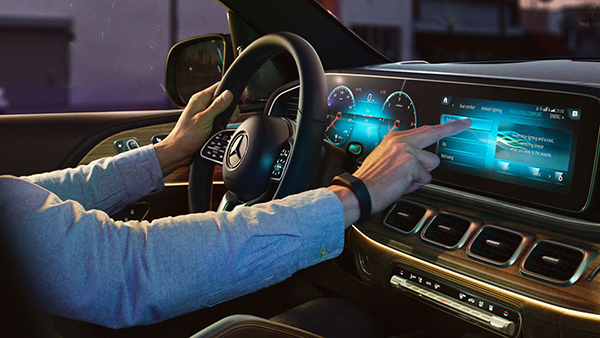
The first car to get the MBUX infotainment system was the Mercedes A-Class, in 2018. Since then, other models including the CLA, GLE, GLS, EQC and GLB have been launched with the tech included.
Eventually all Mercedes models will use it. More recently, the E-Class range has been updated to include MBUX and we expect the next CLS and C-Class models to use MBUX, too.
There are a few benefits to the MBUX set-up, the first being that it uses a faster computer behind the scenes than previous Mercedes systems. That means it’s faster and more responsive than before, emulating how snappy your smartphone feels to use.
There are all sorts of things that you can control using the settings menu including seat positions, ambient lighting, driving modes and lots of phone options including calls, contacts and navigation via Android Auto and Apple CarPlay.
The two most notable features are the clever voice control and ‘augmented reality’ sat-nav. Read more about those below.
MBUX screens
In the A-Class and some of Mercedes’ other small cars, MBUX is displayed on two 10.25-inch screens, but in larger models like the E-Class the screen size is a bit bigger – the displays are still in a twin configuration but they’re each 12.3 inches across.
ND infotainment system found in older cars which has a rotary dial, the MBUX infotainment system uses a touchpad on the centre console. The screen is also a touchscreen, and the steering wheel has some buttons too, so there are plenty of control options.
Voice control using ‘Hey Mercedes’
These options also include voice control, which is activated when you say ‘Hey Mercedes’ – just like you might speak to activate your Android or Apple smartphone’s assistant.
Like those systems you can ask the car questions and get internet-sourced answers, including where nearby petrol stations or car parks are.
It will also respond to more natural speech such as ‘I feel cold’ or ‘play my favourite track’ to turn up the heating or pick a driving song respectively. You can set your sat-nav destination using voice control, too.
MBUX augmented reality navigation
Once you’ve put in where you want to go, the MBUX system can direct you in one of three ways. There’s the normal mapping on the screens, Google or Apple maps via a smartphone app, or augmented reality.
The clever augmented reality feature shows a live feed of the road ahead using a camera up front, and then overlays directions – giving you an arrow at the exact junction to turn at. It’s a slightly gimmicky addition but some of the Auto Express staff have found it very useful.
MBUX Mercedes-Benz User Experience And How To Use It
24/10/2020
No Comments
Mercedes-Benz | Mercedes-AMG
Click to rate this post
[Total: 1 Average: 5]
